
Fancy Fonts Browser Extension
Style the text you select in bold, italic, cursive and other Unicode letters, in place, on any website. Select text in a post, a comment, a bio or a message, right-click and pick a style: the text changes where it is, and Ctrl+Z undoes it. It has the 87 styles of this site's fancy text generators and gives the same results.
 Add to Chrome
Coming soon to Firefox and Edge.


What it does
Style text in place
Your favorite styles are in the right-click menu, each named in its own style. The text changes where it is, in text boxes, rich editors, frames and Google Docs, and Ctrl+Z undoes it in one step.
Style picker
Alt+Shift+Y shows your selection in all 87 styles next to the text, with the site's collections and a filter for names or words such as "cursive" or "gothic". Pick one with a click or Enter.
Shortcuts
Bold (Alt+Shift+O), Italic (Alt+Shift+I) and Remove styling (Alt+Shift+P), and eight more you can bind to your favorite styles.
Toolbar for posts
Turn it on site by site for a small bar over text you select in posts and comments on LinkedIn, X, Facebook, Instagram, Threads and Bluesky. Each site's switch asks for access to that site only.
Careful with links
Hashtags, @mentions and web addresses stay plain when you style a sentence, so they still link. Remove styling turns styled text back into plain letters and says which styles it found.
The popup
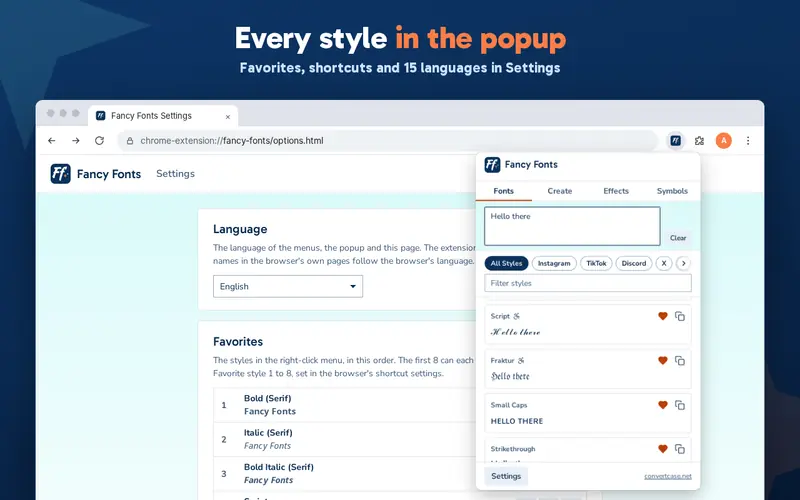
Fonts with counts against each platform's limit, Create for a style of your own, Effects for zalgo text and plain text, and Symbols, as in the Fancy Fonts app.
Privacy
Fancy Fonts asks for no access to your sites when you install it. It runs on a page only when you use it there: a right-click on its menu, a shortcut or the popup. Nothing you select or type is collected, sent or stored anywhere else, and there are no ads, accounts or trackers.
Languages
English, British English, Deutsch, Ελληνικά, Español, Filipino, Français, हिन्दी, Magyar, Italiano, Polski, Português (Brasil), Slovenščina, Türkçe, Українська. It follows your browser's language, and you can choose another in Settings.
Changelog
- 1.0.0 - The first release: styling in place from the right-click menu, shortcuts and the style picker; the popup with Fonts, Create, Effects and Symbols; the toolbar for LinkedIn, X, Facebook, Instagram, Threads and Bluesky; 15 languages
Please get in touch if you find any bugs or have any general feedback.

 Browser Extensions
 iPhone/iPad App
Ff
Fancy Fonts Browser Extension
Fancy Fonts is a free browser extension that styles the text you select with Unicode characters that look like bold, italic, cursive and other letters, in place, on any website. Pick a style from the right-click menu, a shortcut or the style picker, and the text changes where it is, so a post, a comment or a bio can be styled without a trip to a generator and back. It has the styles, collections and counts of this site's font pages, and everything happens on your device.
How do I use the Fancy Fonts extension?
Select text in a text box, a post or a comment, right-click and open Fancy Fonts, then pick a style. For every style at once, press Alt+Shift+Y for the style picker. Ctrl+Z undoes a styling in one step.
Which browsers does it work in?
Fancy Fonts is in the Chrome Web Store now, and also works in other browsers that install from it, such as Brave and Microsoft Edge (Edge asks you to allow extensions from other stores first). The Edge Add-ons and Firefox versions are in review, and this page will link them once their stores list them.
Why does the extension not ask to read my data on all websites?
It asks for no access to your sites when you install it. Chrome gives it the page you are on only at the moment you use it there, from the menu, a shortcut or the popup. The toolbar asks for access to each site you turn it on for, and only then.
Will styled hashtags and links still work?
Hashtags, @mentions, web addresses and emails stay plain when you style a sentence, so they still link. You can turn this off in Settings.
Why do some styles show as boxes?
A device draws a box or a question mark for a character it has no font for, so the text looks right to you and broken to someone else, most often on older phones. The styles most likely to do this say so in the picker and the popup. Bold, italic, script and the other mathematical styles are the safest choice.
How is it different from the Convert Case extension?
The Convert Case extension changes the case of selected text, to UPPER CASE, Title Case, camelCase and the rest. Fancy Fonts changes its look, with Unicode styles. They use different shortcuts, so you can install both.
How much does it cost?
Fancy Fonts is free, with no ads, no account and nothing to unlock.
Last reviewed: November 2026